Prop firm evaluations
Track drawdown, daily loss, profit target and consistency against your own trades.
An evaluation tracks a prop firm account’s rules from your own fills, so you always know how far you are from the floor.
Want to check an account without connecting it? The free prop firm evaluation calculator does the same arithmetic from results you type in.
Set one up
- Choose Add broker or prop firm → Prop firm evaluation, or open Evaluation.
- Name it and start from a preset: Apex 50K (intraday or end-of-day trail), Topstep 50K, a static drawdown, or Custom.
- Check every number against your account — account size, drawdown amount and type, profit target, daily loss limit, minimum trading days and consistency. Firms change their rules and they vary by account size, so every field is editable.
- Choose which trades count: a start date, and optionally just one account name.
Which drawdown types can you track?
Three: intraday trailing, end-of-day trailing and static.
- Intraday trailing
- The floor follows your highest balance, including open profit during the day.
- End-of-day trailing
- The floor moves once a day, on your closing balance.
- Static
- A fixed floor that never moves.
All your accounts on one board
At the top of Evaluation, every account you are tracking sits on one line, the one closest to failing first: room to the floor, today's P&L, how much is left before the firm's daily loss limit, and whether a payout is clear. Most funded traders run several accounts, and the question is always which one is in trouble.
The payout planner
Under each account, Crux answers the question every funded trader asks before requesting money: what is in the way? It works from your own trades, in the firm's own terms.
- Profit target and minimum trading days, with how far off you are.
- The consistency rule, which catches people out: if your best day is more than the firm's share of total profit, Crux says how much more profit would fix it, and what the biggest day you can afford from here is.
An account that has breached is told that one thing rather than a payout path, and an account whose payout rules were never entered says so rather than reading as ready.
Alerts
Crux watches every active evaluation after each sync, about every 15 minutes, and tells you when a line gets close. You get an email and a banner at the top of the app:
- Drawdown: when half your cushion is used, when a quarter or less is left, and if the account goes through its floor.
- Daily loss limit: at 75% of the firm’s limit, and when it is reached.
- Your own limits: the daily loss limit and daily target you set under Settings work the same way, whether or not you trade an evaluation.
Each step is sent once. If an account recovers and slips back, you hear about it again. Alerts only cover recent trading, so an old evaluation never emails you about last month. To stop the emails, untick Email me alerts in Settings; the banner stays.
When an evaluation is over, Archive it to keep the record without showing it on the page. Evaluations and alerts are part of the Elite plan.
An example: a trailing floor
A 50K evaluation with a $2,000 end-of-day trailing drawdown starts with its floor at $48,000. Close day one at $50,600 and the floor follows to $48,600. Close day two at $50,300 and the floor stays at $48,600, leaving $1,700 of room. Crux shows that room, today’s P&L and the daily loss limit side by side, and alerts you before you get close. Read the trailing drawdown guide for the intraday version.
Figures in the example are illustrative, to show the arithmetic. Your own come from your account.
An example: the consistency rule
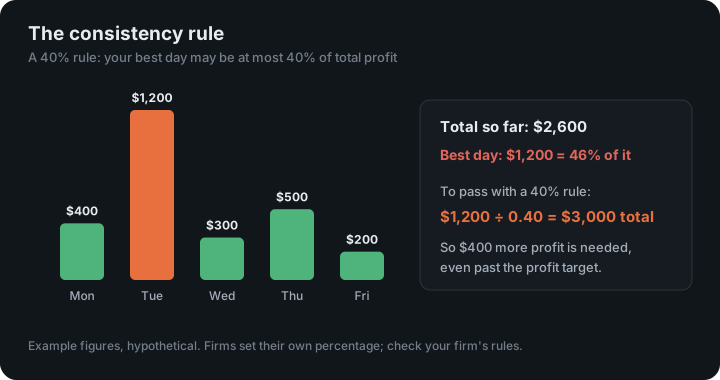
With a 40% consistency rule, no single day may be more than 40% of your total profit. If your best day made $1,200, you need at least $3,000 of total profit before you can pass, even if the profit target is lower. Crux shows that number, and the largest day you can afford from here without making it worse.
Firms publish their rules in their own help centres, and those are the numbers to enter: for example Topstep’s Maximum Loss Limit and LucidFlex’s drawdown.
Keep reading
- Habits — Patterns in how you trade after wins and losses, straight from your fills.
- Weekly and monthly reviews — Your week or month written up, compared with the one before, with one thing to work on.
- Playbooks and plan edge — Write your setups as rules and see what following them is worth.
- Free prop firm evaluation calculator
- The LucidFlex daily loss limit, explained
- Trailing drawdown, explained
- The prop firm consistency rule, explained