Getting started
To start with Crux, sign up at app.cruxjournal.com with Google or an email address. The 7-day free trial begins at once with every feature on, and no card is needed. Then bring in your trades: connect a broker, import a CSV file, or set up a prop firm evaluation. Your dashboard fills in as they arrive.
Create an account, bring in your trades and find your way around.
Crux is a trading journal. It brings in your trades, then shows you what your plan is worth, which habits cost you, and how much room you have left on a prop firm account.
1. Create your account
- Go to app.cruxjournal.com and choose Sign up.
- Choose Continue with Google, or enter your email and a password. Google confirms who you are and gives Crux your name and email address (Google explains how Sign in with Google works). If you have a promo code, put it in the code box first: some codes give you a longer free trial.
- Your 7-day free trial starts straight away with every feature switched on. No card is needed.
2. How do you bring in your trades?
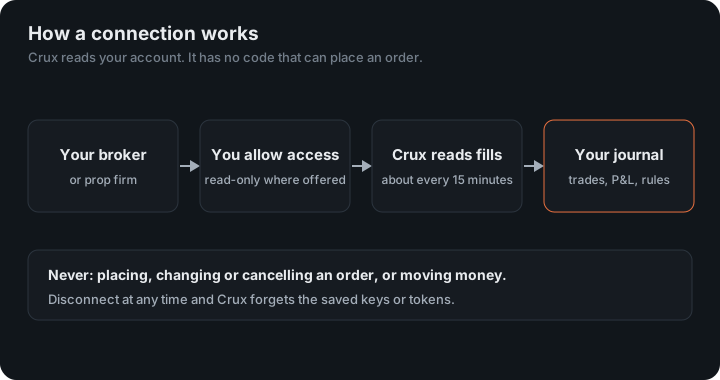
Choose Add broker or prop firm on the dashboard. Search for your broker or prop firm and Crux takes you to the right connection. You have three options:
- Connect a broker so trades arrive on their own. See Connecting a broker.
- Import a file if your broker isn’t connected yet. Almost every broker can export a CSV. See Importing files.
- Set up a prop firm evaluation to track your drawdown against trades you already have. See Prop firm evaluations.
You can add as many connections and accounts as you like.
A journal is for learning from your trades, not for your taxes. Your broker’s statements stay the official record of what you bought and sold. In the US, IRS Publication 550 explains how sales of investments are reported.
3. Find your way around
- Dashboard
- Your P&L, win rate and the numbers that matter at a glance, filterable by account and symbol. Arrange it however you like.
- Calendar
- Every trading day coloured by result. Click a day to see its trades.
- Trades
- Every trade. Open one to add a setup, tags, a rating, notes and screenshots.
- Analytics
- Results broken down by time of day, weekday, symbol, setup and more.
- Playbook
- Your setups written as rules, and what following them is worth. See Playbooks.
- Habits
- Patterns in how you trade after wins and losses. See Habits.
- Evaluation
- Prop firm drawdown, daily loss and profit target tracking.
- Profile
- Your connections, plan and billing, and closing your account.
4. Make the dashboard yours
The dashboard starts with the basics: net P&L, win rate, profit factor, expectancy, what your plan is worth, your equity curve and your last few trades. Everything else in Crux is available to put on it — more than thirty cards in all — so the dashboard can end up being the only screen you open.
Choose Customise at the top right and every card gets a grip.
- Move a card by dragging its grip, with a mouse or a finger. The arrow buttons on each card do the same thing, and so do the arrow keys once the grip has focus.
- Add cards from Add a widget, grouped by what they are: key numbers, charts, tables, your plan, and the rest of Crux. Add all puts every one of them on at once if you would rather start from everything and cut back.
- Remove a card with the × on it. It goes straight back into Add a widget, so nothing is lost.
- Start from nothing with Clear all. An empty dashboard is a perfectly good dashboard.
- Reset to basics puts back the seven cards you began with.
What you can put on it
- Key numbers
- Your account balance, net P&L, win rate, profit factor, expectancy, average win against loss, max drawdown, green days and your current streak — each one its own card, so you can keep two and drop six.
- Charts
- Equity curve, daily net P&L, the spread of your results, time of day, and drawdown.
- Tables
- By symbol, setup, tag, account, day of week, hold time, side and market, plus your most recent trades.
- Your plan
- Plan adherence, the habits that are costing you, the daily check-in, your monthly goals and your scaling plan.
- The rest of Crux
- This month’s calendar, your latest review, risk rules, what-if suggestions, every funded account on one board, evaluation headroom, your playbook, the before-you-trade verdict, the verse of the day, and when your brokers last synced.
Your arrangement saves itself as you go and follows your account, so it is the same on your laptop and your phone. Cards belonging to a plan you are not on simply are not offered; if you change plan later, anything you had arranged comes back.
Once your trades are in, a few things are worth setting up, depending on your plan. Write your risk rules and a scaling plan, and answer the daily check-in before you trade. Every Monday a weekly review arrives with one thing to fix. You can share your stats as an image, or publish a public page. If trades stop arriving, see Sync problems. Your data covers exporting and closing your account, and everything else is in the help centre.