Connect Binance.US
Binance.US is a US cryptocurrency exchange. Crux reads your Binance.US trades with a read-only API key.
Create a read-only API key in Binance.US.
In Binance.US, once
- Go to Profile → API Management → Create API.
- Leave Enable Reading on and every trading and withdrawal permission off.
- Copy the API key and Secret key.
In Crux
- Choose Add broker or prop firm → Connect Binance.US.
- Paste the API key and Secret key.
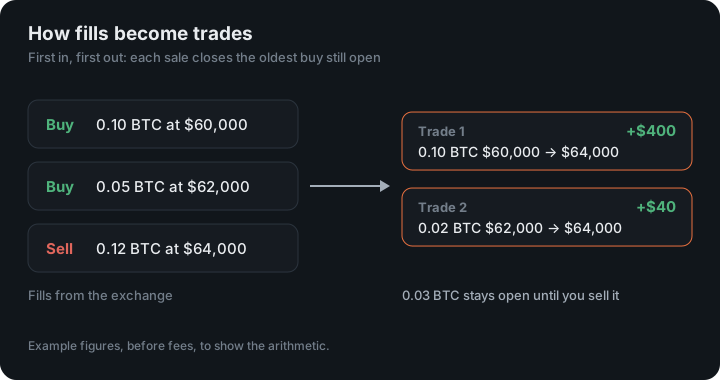
- Choose Connect and import. Crux checks the key with Binance.US first, then imports your fills and pairs your buys and sells into trades.
Why are some older Binance.US trades missing?
Binance.US only reports trades one coin at a time. Crux reads every coin you hold now, plus any coin it has seen before. A coin you sold completely before connecting won’t be found — export those trades from Binance.US and import the file.
How does Crux turn Binance.US fills into trades?
It pairs your buys and sells first in, first out, into trades with an entry, an exit, fees and P&L. Binance.US reports fills (each buy and sell), not whole trades. A sell with no earlier buy stored — say, coins you bought before the history Crux can see — isn’t counted as a short. It’s left out rather than guessed.
Trades from Kraken, Coinbase, OKX, Crypto.com and Robinhood are paired the same way.
Which pairs does Crux ask about?
Binance.US has no way to list every pair an account has traded; it answers one pair at a time. So Crux asks for the pairs that can matter: each coin you hold now, against USD, USDT, USDC, BTC, ETH and BUSD, plus every pair it has already stored fills for. Once a pair is in your journal it is checked on every sync, even after you have sold out of it.
The one case this misses is a coin you sold completely before you connected, because there is nothing left in the account to say you ever held it. Export those trades from Binance.US and import the file; after that, Crux knows the pair and keeps it up to date.
Is the key checked?
Where Binance.US reports a key’s restrictions, Crux refuses one that can trade or withdraw. Create the key with reading enabled only.
An example
You buy 0.5 SOL against USDT at 150, then sell it against USDT at 162. That is one SOLUSDT trade with $6 of profit before fees. A sale of the same SOL against USD would be a different pair, and Crux pairs it within that pair.
Figures in the example are illustrative, to show the arithmetic. Your own come from your account.
Deposits and transfers
Only trades come in. Deposits, withdrawals and transfers aren’t trades, so they stay out of your P&L, and a sale of coins you deposited rather than bought here has no buy to pair with, so it is left out rather than counted as a short.
Keep reading
- Connect Robinhood Crypto — Crux creates a key for you; paste its public half into Robinhood.
- Connect NinjaTrader or Tradovate — One read-only sign-in for any account that runs on Tradovate — prop firm accounts included.
- Connect Crypto.com Exchange — Create an API key on the Crypto.com Exchange with trading off.