What the daily loss limit is
A daily loss limit caps how much an account can lose in one trading session. On LucidFlex it is a choice you make at checkout, not a fixed rule:
- Daily loss limit on: the limit applies to the evaluation and to the funded account, and the evaluation costs less. Funded accounts with it on get Lucid’s on-demand payouts.
- Daily loss limit off: there is no daily cap in either stage, and the evaluation costs more.
The setting is locked once the account is active, so you cannot switch it off after a bad week. Many guides written before 2026 say LucidFlex has no daily limit at all; that was true before Lucid made it optional.
The dollar amount depends on the account size and is shown when you buy. The examples below use $1,200, a figure reported for the 50K account. Use your own.
What happens when you hit it
Lucid calls the daily loss limit a soft breach: you are locked out until the next trading session, and the account carries on. Lucid’s help centre describes a session as running from 6:00 PM to 3:45 PM Eastern, so the lockout clears with the next session’s open.
The rule that does end the account is the maximum loss limit (MLL). On LucidFlex it trails your balance at the end of each day rather than during it. Breach the MLL and the account is over, whether or not you have a daily limit.
The tighter line wins
On any given day you have two lines below you: the daily loss limit, and the MLL floor. The one that is closer is the one that matters.
Say your daily limit is $1,200, but after a rough week your balance is only $700 above the MLL floor. Your real limit today is $700. Lose $700 and the account is gone, long before the daily limit would have locked you out. Work out both distances before the first trade.
Open losses: plan as if they count
Lucid’s help article does not say whether an open position’s loss counts toward the daily limit before you close it. Most futures prop firms count open and closed losses together, so that is the safe way to plan. Ask Lucid support for the rule on your account.
If open losses do count, a partial close does not give you room back. Down $900 on a $1,200 limit, closing half of the position turns $450 into a closed loss and leaves $450 open. That is still $900 used and $300 left.
Holding through the end of the session raises the same question. Losses on a position carried into the next session count against that session. Check whether your account lets you hold through the close at all.
How to size trades around the limit
Treat the limit as a budget for the whole session, not a size for one trade. Two steps:
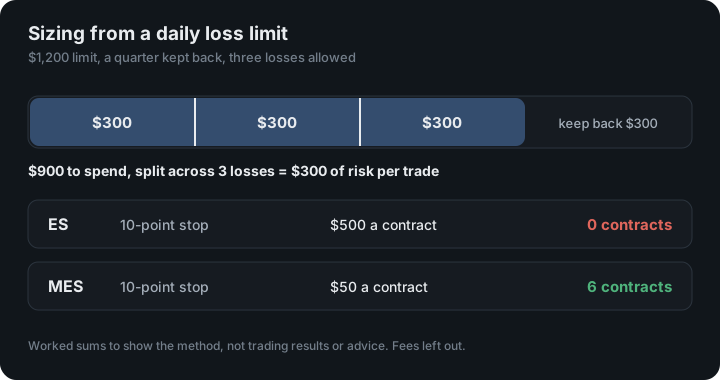
- Keep some back. Slippage, fees and a fast market all cost more than the stop. Keeping a quarter of the limit back covers them: $1,200 becomes $900 you plan to spend.
- Split it across the losses you will allow. If three full losses end your day, each trade gets a third: $900 ÷ 3 = $300 of risk per trade.
Then size each market from that $300:
contracts = risk per trade ÷ (stop distance × dollar value of one point)
| Market | Stop | Risk per contract | Contracts for $300 |
|---|---|---|---|
| ES | 10 points | $500 | 0 (too big) |
| MES | 10 points | $50 | 6 |
| NQ | 20 points | $400 | 0 (too big) |
| MNQ | 20 points | $40 | 7 |
| CL | 20 cents | $200 | 1 |
| MCL | 20 cents | $20 | 15 |
Point values: ES $50, MES $5, NQ $20, MNQ $2, CL $1,000 per $1.00 move, MCL $100 per $1.00 move, from CME Group’s contract specifications (for example the E-mini S&P 500 and Micro E-mini S&P 500). Results are rounded down and leave out fees. These are worked sums to show the method, not trading results or advice.
Notice the first row. At this budget, one ES contract on a 10-point stop risks $500, more than the whole per-trade budget. The micro contract is the way to trade that idea. Size per market, never per account.
Before every session
- Write down today’s daily limit, your distance to the MLL floor, and the smaller of the two.
- Decide how many losses end the day, and the risk per trade that follows.
- Size each trade from that number, with your stop already placed.
- Stop at your own line, well before Lucid’s.
Tracking it in Crux
Crux is a trading journal. It reads your fills; it never places a trade. Here is what it does with a Lucid account:
- Evaluation tracks the account against its rules. Lucid has no preset, so choose Custom, pick end-of-day trailing, and enter the drawdown, daily loss limit, profit target and consistency rule from your dashboard. How evaluations work.
- Alerts email you at 75% of the firm’s daily limit and when it is reached, and when half your drawdown cushion is used. They come from closed trades, so an open position is not counted until it closes. Lucid’s dashboard is the live number.
- Before you trade puts the method above in one place: it takes the tightest room you have, across your own daily limit and every evaluation, and divides it by what one contract loses at your stop. How it works.
Evaluations and alerts are on the Elite plan and in every free trial. To check an account without connecting anything, the free prop firm calculator does the drawdown and consistency sums from numbers you type in.
Questions
Does LucidFlex have a daily loss limit?
Only if you choose one. Lucid lets you turn the daily loss limit on or off when you buy a LucidFlex account. With it on, the evaluation costs less and the limit applies to both the evaluation and the funded account. You cannot change the setting on an active account.
What happens if I hit the LucidFlex daily loss limit?
Lucid calls it a soft breach: you are locked out until the next trading session. The account is not failed by the daily limit alone. The maximum loss limit is a separate rule, and breaching that one ends the account.
Do open losses count toward the daily loss limit?
Lucid's help article does not say. Plan as if they do, because most futures prop firms count open and closed losses together, and a lockout triggered by an open trade does not come back if the trade recovers. Ask Lucid support for the rule on your account.
When does the LucidFlex daily loss limit reset?
At the next trading session. Lucid's help centre describes a session as running from 6:00 PM to 3:45 PM Eastern. Check the exact time on your dashboard.
How many contracts can I trade with a daily loss limit?
Divide the part of the limit you are willing to spend on one trade by what one contract loses at your stop. With a $1,200 limit, a quarter kept back and room for three losses, that is $300 a trade: six MES contracts on a 10-point stop, but not one ES contract.
Source: Lucid Trading: LucidFlex Customization, read on 18 October 2026. Lucid Trading is a trademark of its owner; Crux is not affiliated with Lucid Trading. Seen something out of date? Email support@cruxjournal.com and we will fix it.