Connect TradeLocker
Sign in with your TradeLocker login. Prop firm accounts included.
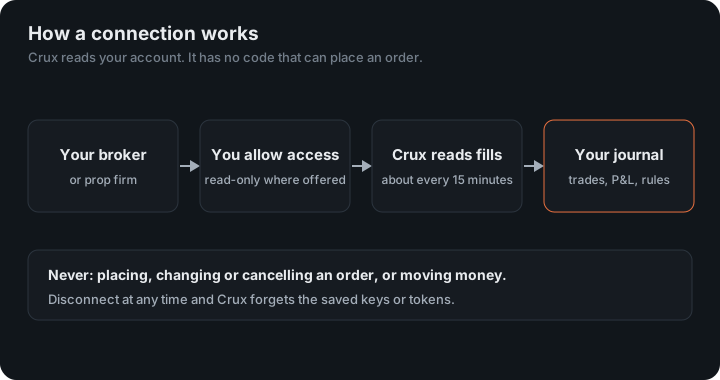
TradeLocker is the platform behind many newer prop firms. Crux signs in with the same login you trade with and reads your history from TradeLocker.
In Crux
- Choose Add broker or prop firm → Connect TradeLocker.
- Choose Prop firm or demo for an evaluation or funded account, or Live for your own money.
- Enter the server, email and password your prop firm or broker gave you for TradeLocker — the server is shown on the TradeLocker sign-in screen.
- Choose Connect and import.
What arrives from TradeLocker?
Your filled orders, paired first in, first out into trades, with each account’s balance. New trades then arrive on their own about every 15 minutes.
TradeLocker’s history doesn’t include commissions or swaps, so P&L is before them. Something look wrong? Email support@cruxjournal.com and we’ll fix it quickly.
Why does Crux need my TradeLocker login?
TradeLocker’s public API has no read-only credential: the only way in is the same email, password and server you sign in to the platform with. Crux keeps them encrypted, signs in only to read your accounts, instruments and order history, and has no code that can send an order. A test in Crux’s build fails if order-placing code ever appears. Disconnect and the login is deleted.
Prop firm or live?
Prop firm evaluation and funded accounts run on TradeLocker’s demo environment, because they trade simulated money. Your own money is on live. Choose the right one when you connect; the wrong choice signs in fine but finds no accounts.
How are the numbers worked out?
TradeLocker reports filled orders but no P&L per trade, so Crux pairs the fills itself, first in, first out, per account and symbol, the way a netting account books them. Each instrument’s lot size comes from TradeLocker: 100,000 units for a forex lot, 100 for gold, 1 for most indices.
Two gaps, said plainly
- Commissions and swaps aren’t in TradeLocker’s order history, so P&L is before them. Your platform statement shows the costs.
- Currency. P&L comes out in the pair’s quote currency. Where the account’s currency is the pair’s base, such as USD/JPY on a USD account, Crux converts at the exit price. A true cross, such as EUR/GBP on a USD account, stays in its own currency rather than being converted at a rate Crux doesn’t have.
The first sync reads all the order history TradeLocker returns; later ones start from the last fill Crux stored, with a day of overlap so nothing near the edge is missed.
Examples
- Forex: 0.5 lots of EUR/USD from 1.0800 to 1.0830 is 50,000 units × 0.0030 = $150 before costs.
- Gold: 1 lot is 100 ounces, so a $5 move is $500.
Figures in the example are illustrative, to show the arithmetic. Your own come from your account.
Keep reading
- Connect Topstep — Connect TopstepX with your username and a ProjectX API key.
- Connect DXtrade — Sign in with your DXtrade login, where your firm allows it.
- Connect NinjaTrader or Tradovate — One read-only sign-in for any account that runs on Tradovate — prop firm accounts included.