Connect OANDA
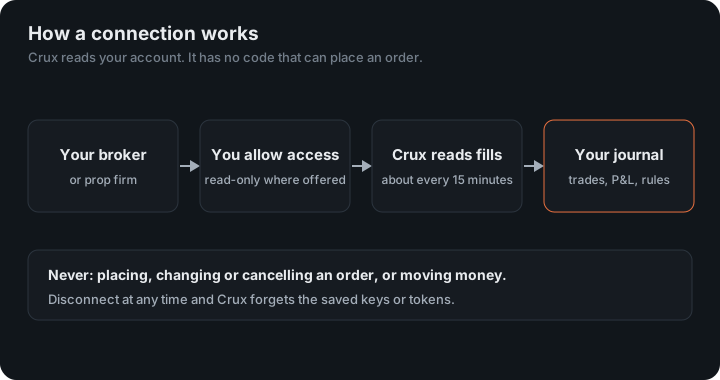
OANDA is a forex broker. Crux reads your OANDA trades with a read-only API token you create.
Paste a read-only API token from your OANDA account.
Where do you get an OANDA token?
- Sign in to OANDA and go to My Account → Manage API Access.
- Generate a token. Choose read-only if the option is offered.
- Copy the token.
In Crux
- Choose Add broker or prop firm → Connect OANDA.
- Pick Live or Practice / demo.
- Paste the token and choose Connect and import. Crux checks the token first, then imports your closed trades, financing included.
The token isn’t your password and can’t be used to sign in. You can revoke it from the same OANDA screen whenever you like.
What does Crux do differently with OANDA?
OANDA is the one connection that hands over finished trades. Every other broker sends fills, each buy and each sell, and Crux pairs them into trades itself. OANDA’s closed trades already carry the entry price, the average close price and the realised P&L, so nothing is inferred: what you see in Crux is what OANDA booked.
Financing is added back
OANDA reports overnight financing separately from a trade’s realised P&L. Crux adds it back to each trade, so a position held for three nights shows those three nights in its net result instead of looking better than it was.
Units become lots
OANDA measures size in units. Crux shows forex in lots, 100,000 units to one standard lot, the same as cTrader and file imports, so an average size means the same thing across every account you track. 25,000 units shows as 0.25 lots. Other instruments, such as indices and metals, stay in OANDA’s own units.
An example
You buy 50,000 units of EUR/USD at 1.0850 and close them two days later at 1.0890. OANDA books $200 of realised P&L and, separately, two nights of financing of −$3.10. Crux records one trade: 0.5 lots, entry 1.0850, exit 1.0890, net $196.90.
Figures in the example are illustrative, to show the arithmetic. Your own come from your account.
Which accounts does it read?
Every account the token can see, so one token covers all the sub-accounts under your login. Pick Live or Practice / demo when you connect: they are separate environments, and a token from one can’t see the other. If you trade both, connect twice. Only closed trades come in; a position that is still open appears at the first sync after you close it, about every 15 minutes.
If Crux shows Reconnect against OANDA, the token has usually been revoked or replaced in Manage API Access. Paste the new one and the next sync carries on from where the last one stopped; nothing already imported is lost.
Your balance, straight from OANDA
OANDA reports each account’s balance, and Crux shows it as it is, refreshed every sync, with how long ago it was read. It already includes your deposits and withdrawals, so you don’t need to record them. That balance can drive a scaling plan, so your size steps follow the account OANDA actually holds.
Keep reading
- Connect cTrader — Sign in on cTrader and grant read-only access. Works with every cTrader broker and prop firm.
- Connect tastytrade — Sign in on tastytrade and grant read-only access. Stocks, options, futures and crypto.
- Connecting a broker — Which brokers and exchanges connect, and where each one works.