Plans, billing and refunds
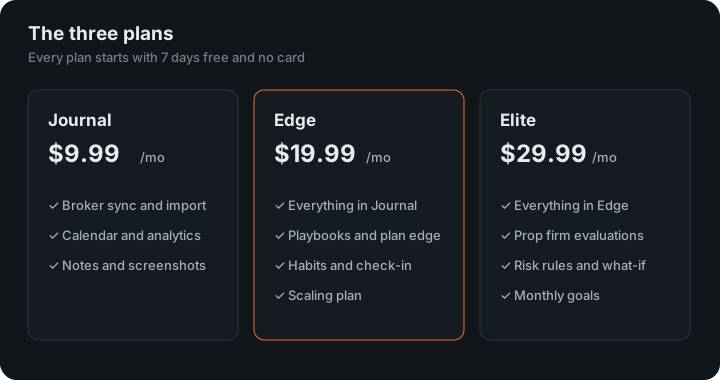
Crux costs $9.99 a month for Journal, $19.99 for Edge and $29.99 for Elite, or $99.99, $199.99 and $299.99 a year. Every account starts with 7 days free with every feature and no card. Change plan or cancel any time under Profile, then Manage billing; ask within 7 days of a first payment and it is refunded in full.
The free trial, what each plan includes, changing plans, cancelling and refunds.
The free trial
Every new account gets 7 days free with every feature and no card. A promo code can make the trial longer. When the trial ends without a plan, your trades, calendar and exports stay available and the other features pause until you choose one. New to Crux? Getting started walks through signing up and bringing in your trades.
Plans
| Plan | Monthly | Yearly | The short version |
|---|---|---|---|
| Journal | $9.99 | $99.99 | Unlimited trades and accounts, automatic broker connections, your account balance, calendar, analytics, notes, screenshots, tags, file import. |
| Edge | $19.99 | $199.99 | Everything in Journal, plus playbooks and plan edge, habits, the daily check-in and a scaling plan. |
| Elite | $29.99 | $299.99 | Everything in Edge, plus prop firm evaluations, drawdown limits and alerts. |
Yearly works out at two months free. You can move between plans whenever you like, and Stripe works out the difference for you.
Compare the plans
Line by line. The same table is inside Crux under Profile → Compare plans, where the plan you are on is marked.
| What you get | Journal $9.99/mo | Edge $19.99/mo | Elite $29.99/mo |
|---|---|---|---|
| The journal | |||
| Unlimited trades and accounts | ✓ | ✓ | ✓ |
| Calendar and daily write-ups | ✓ | ✓ | ✓ |
| Analytics: expectancy, R, drawdown | ✓ | ✓ | ✓ |
| Weekly and monthly review, emailed to you | ✓ | ✓ | ✓ |
| Notes, tags and screenshots | ✓ | ✓ | ✓ |
| Automatic broker connections | ✓ | ✓ | ✓ |
| File import from any broker | ✓ | ✓ | ✓ |
| Account balance, straight from your broker where it reports one | ✓ | ✓ | ✓ |
| Export everything you have | ✓ | ✓ | ✓ |
| Working on your plan | |||
| Playbooks: your setups, written down | — | ✓ | ✓ |
| Plan-adherence scoring | — | ✓ | ✓ |
| The habits engine | — | ✓ | ✓ |
| Daily check-in: how sleep, stress and focus move your results | — | ✓ | ✓ |
| Scaling plan: size up only when you hit your own number | — | ✓ | ✓ |
| Your own rules and goals | |||
| Personal risk rules, checked on every trade | — | — | ✓ |
| Alerts the moment you break one | — | — | ✓ |
| What-if simulator: test a rule on your own history | — | — | ✓ |
| Monthly goals with progress | — | — | ✓ |
| Funded and evaluation accounts | |||
| Prop firm evaluations tracked for you | — | — | ✓ |
| All your funded accounts on one board, worst first | — | — | ✓ |
| Payout planner: what stands between you and a withdrawal | — | — | ✓ |
| Email alerts before a drawdown or daily limit | — | — | ✓ |
| Multiple accounts side by side | — | — | ✓ |
| Everything else | |||
| Pre-trade check: every limit answered before you click | ✓ | ✓ | ✓ |
| Seven days free, no card | ✓ | ✓ | ✓ |
| Your data stays yours, export any time | ✓ | ✓ | ✓ |
| Read-only broker access, always | ✓ | ✓ | ✓ |
| Share your week or month as an image to post | ✓ | ✓ | ✓ |
| A public page for your record, saying what was synced and what was typed | ✓ | ✓ | ✓ |
| An optional daily Bible verse | ✓ | ✓ | ✓ |
If your trial or plan ends
Nothing is deleted and nothing is held hostage. Whatever happens to your subscription you can always read your trades, open the calendar and export everything as CSV. What pauses is the rest: adding or editing trades, analytics, playbooks, habits, evaluations, file import and automatic broker sync. Pick a plan and it all comes back exactly as you left it.
A payment that fails is not the same thing. If your card is declined you keep your plan while Stripe retries and you update the card. Nobody is locked out of their own journal over a payment problem. Stripe explains how it retries a failed payment.
Using a code
Codes add free days to your trial. There are two places to enter one:
- On the pricing page, in the Have a code? box. The code travels with you into sign-up.
- On the sign-up screen itself, in the Promo code field.
A code is applied when the account is created, so enter it before signing up rather than after. Codes lengthen the free period rather than discounting a plan.
Change plan, update your card or see invoices
Open Profile and choose Manage billing. From there you can switch plans, move between monthly and yearly, update your payment method and download invoices.
That screen is Stripe’s customer portal, so your card details go to Stripe and never to Crux. Stripe is certified as a PCI Service Provider Level 1 under the card industry’s PCI Data Security Standard. Stripe documents what the portal does in its customer portal guide.
Cancel
Open Profile → Manage billing and cancel. Cancelling takes effect at the end of the period you’ve paid for, and you keep access until then.
Can you get a refund?
If Crux isn’t for you, ask within 7 days of your first payment for a plan and we’ll refund it in full. Email support@cruxjournal.com from the address on your account. After that, payments aren’t refunded for the rest of a billing period — cancelling stops the next renewal. Billing mistakes are always refunded. The full terms are in the Terms of Service.
Keep reading
- Your public page — Publish your totals at cruxjournal.com/t/your-handle, with an honest provenance line.
- Your data and closing your account — Exporting, backups, disconnecting a broker, deleting trades and closing your account.
- Disclosures