Connect OKX
OKX is a cryptocurrency exchange. Crux reads your OKX trades with a read-only API key.
Create a read-only API key and passphrase in OKX.
In OKX, once
- Go to Profile → API keys → Create API key.
- Set the permission to Read only. Leave Trade and Withdraw off.
- Choose a passphrase and note it — OKX won’t show it again.
- Copy the API key and Secret key.
In Crux
- Choose Add broker or prop firm → Connect OKX.
- Choose where your account is — OKX (global), OKX United States or OKX Europe — then paste the API key, secret key and passphrase.
- Choose Connect and import. Crux checks the key with OKX first, then imports your fills and pairs your buys and sells into trades.
How much OKX history can Crux read?
- OKX only makes the last three months of trades available this way. For older history, export a file from OKX and import it.
- Spot and margin trades both import. Margin trades are kept on their own book and can be short.
- If Crux says the key was refused, check you picked the right OKX site — accounts on one can’t be seen from another.
How does Crux turn OKX fills into trades?
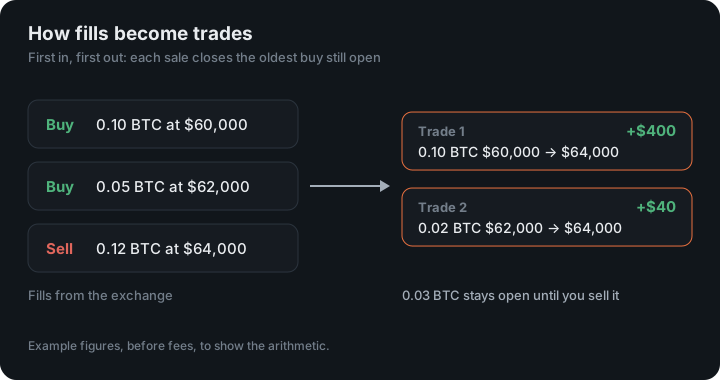
It pairs your buys and sells first in, first out, into trades with an entry, an exit, fees and P&L. OKX reports fills (each buy and sell), not whole trades. A sell with no earlier buy stored — say, coins you bought before the history Crux can see — isn’t counted as a short. It’s left out rather than guessed.
Trades from Kraken, Coinbase, Crypto.com, Binance.US and Robinhood are paired the same way.
Which OKX site am I on?
OKX runs three separate sites, and an account on one can’t be seen from another:
- OKX (global) at www.okx.com
- OKX United States at us.okx.com
- OKX Europe at eea.okx.com
If you aren’t sure, it is the address you sign in at. A key created on one site and connected as another is refused.
Is the key checked?
Yes. Before importing, Crux reads the key’s permissions from your OKX account and refuses one that can trade or withdraw. The passphrase is part of the key: Crux needs it to sign each request, and OKX shows it only once, when you create it.
An example: a margin short
On margin, you sell 1 ETH at $3,200 and buy it back at $3,050. Crux pairs the sale with the later buy as a short: one trade, $150 before fees. The same sale on spot, with no ETH bought here first, would be left out instead, because spot can’t be short.
Figures in the example are illustrative, to show the arithmetic. Your own come from your account.
What isn’t imported
Deposits, withdrawals, transfers and earn or staking rewards aren’t trades, so they stay out of your P&L.
Sub-accounts and lost passphrases
An OKX key reads the account it was created in. If you trade in a sub-account, create the key there, or connect each account with its own key. OKX shows a key’s passphrase only once; if it is lost, delete the key and create a new one. Fees OKX charges in the coin you bought are converted to the quote currency at the fill’s price, so every fee in Crux is in the same currency as the trade’s P&L.
Every spot and margin pair you traded in those three months comes in, whatever its quote currency, and each is kept apart so a BTC-USDT trade and a BTC-USDC trade are never paired together.
The three-month window is set out in OKX’s API documentation. Each request is signed with HMAC-SHA256: the keyed-hash method in RFC 2104, built on the SHA-256 hash that NIST defines in FIPS 180-4. Only the signature is sent, so the secret itself never leaves Crux.
Keep reading
- Connect Coinbase — Create a view-only API key on the Coinbase Developer Platform.
- Connect Crypto.com Exchange — Create an API key on the Crypto.com Exchange with trading off.
- Connect Kraken — Create a read-only API key in Kraken.