Your data and closing your account
Exporting, backups, disconnecting a broker, deleting trades and closing your account.
Your trades and notes are yours.
Export your trades
On the Trades page, choose Export CSV to export the trades you’re looking at, or use Export all trades in Settings. The file includes your setups, tags, ratings, notes and playbook scores, and it imports back into Crux losslessly.
Backups
Crux copies your journal once a day, the first time you use it, and keeps the last 30. In Settings → Backups you can take one now or restore an earlier one. Deleting trades always takes a backup first, so it can be undone.
Disconnect a broker
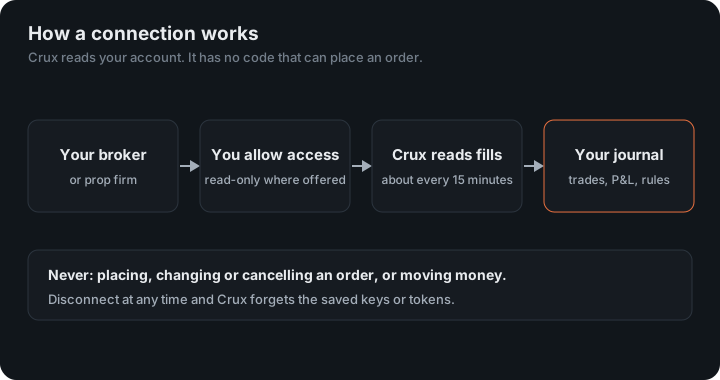
Open Profile and disconnect it. Crux forgets that broker’s saved keys or tokens and stops syncing it. Trades already imported stay — deleting them is a separate step. For full peace of mind, also revoke the token or delete the API key at the broker.
How do you close your account?
Open Profile → Close account. Any subscription is cancelled. Export your trades first if you want to keep them. See the Privacy Policy for what happens to your data.
How your connections are kept safe
- Crux has no code that can place an order, and a test in its build fails if any appears.
- Keys, tokens and logins are encrypted when stored. Crux never shows them back to you or to anyone else.
- Where a broker offers its own sign-in, it happens on the broker’s site and Crux never sees that password. Where a platform offers nothing read-only, Crux says so before you connect.
What’s in the export?
One row per trade: date, times, symbol, side, size, prices, fees and P&L, plus everything you added: setup, tags, rating, notes, mistakes and how each trade scored against its playbook. The playbook column carries each rule’s wording with its verdict, so importing the file into another Crux account rebuilds the playbooks too. Notes you wrote after a trade was imported are never overwritten by a later import of the same trade.
What do backups cover?
Your journal: trades, notes, tags, scores and settings. The trades could be re-imported from a broker; your notes and scores couldn’t, which is why they are copied every day and kept for 30 days. A backup is taken while the journal is in use without stopping anything.
Which connections hold something that could trade?
Most connections are read-only at the broker’s end. Three aren’t, because the platform offers nothing else: TradeLocker and DXtrade use your platform login, and TopstepX uses an API key. Crux keeps them encrypted, uses them only to read, has no code that can send an order, and deletes them when you disconnect. Everywhere a broker offers its own sign-in, it happens on the broker’s site, and Crux never sees that password.
Restoring a backup
Open Settings → Backups, choose the date to go back to and restore it. Your journal returns to exactly that point, and trades that arrived since come back in with the next sync. Notes you wrote after that backup are not in it, so export first if you might want them.
Moving your journal
To move to another Crux account, export all trades from Settings and import the file into the new one. Setups, tags, ratings, notes and playbook scores come with it.
Keep reading
- Plans, billing and refunds — The free trial, what each plan includes, changing plans, cancelling and refunds.
- Your public page — Publish your totals at cruxjournal.com/t/your-handle, with an honest provenance line.
- All help topics