Connecting a broker
Which brokers and exchanges connect, and where each one works.
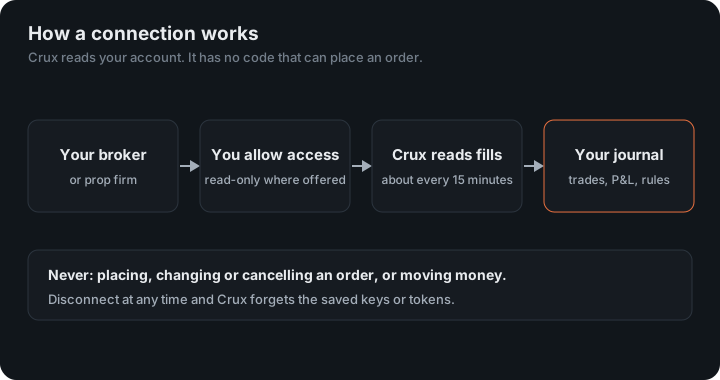
Choose Add broker or prop firm on the dashboard, then search for your broker or pick a connection. Once connected, new trades arrive on their own.
What connects today
| Broker or exchange | How it connects | Status |
|---|---|---|
| cTrader (FTMO, FundedNext, Pepperstone and 250+ more) | Sign in on cTrader | Connects |
| OANDA | Read-only token | Connects |
| Interactive Brokers | Flex report token | Connects |
| tastytrade | Sign in on tastytrade | Connects |
| Kraken | Read-only API key | Connects |
| Coinbase | View-only API key | Connects |
| OKX | Read-only API key | Connects |
| Crypto.com Exchange | API key, trading off | Connects |
| Robinhood Crypto | Key Crux creates for you | Connects |
| Binance.US | Read-only API key | Connects |
| NinjaTrader (Apex, Bulenox, Take Profit and more) | Sign in with Tradovate | Connects |
| Tradovate | Sign in with Tradovate | Connects |
| Topstep (TopstepX) | Username and API key | Connects |
| TradeLocker (prop firms on TradeLocker) | Your TradeLocker login | Connects |
| DXtrade (Tradeify 247 and other DXtrade firms) | Your DXtrade login | Connects |
Is my broker missing?
Check whether it offers cTrader first. More than 250 brokers and prop firms run accounts on cTrader, far more than this table can name. If yours does and your account uses it, connect cTrader and your trades sync on their own.
Otherwise you aren’t stuck. Export your trades as a CSV or a MetaTrader statement and import the file; columns are detected automatically.
Ask us to connect your broker
Requests decide what we connect next. Leave your email if you’d like to hear when yours arrives.
Which plan do I need?
Any of them. Automatic broker connections and file import are both on every plan, Journal included, and in every free trial. See Plans and billing.
How often trades arrive
Connected brokers sync automatically about every 15 minutes, and you can press Sync any time. See Sync problems if something doesn’t arrive.
What does each kind of connection give Crux?
- Sign in on the broker’s site (cTrader, tastytrade, NinjaTrader and Tradovate): you approve access on their screen and Crux receives a token. It never sees your password, and you can revoke the token there.
- A key or token you create (OANDA, Interactive Brokers, Kraken, Coinbase, OKX, Crypto.com, Binance.US, Robinhood): you choose its permissions. Where the exchange reports them, Crux refuses a key that could trade or withdraw.
- Your platform login or a key that could trade (TradeLocker, DXtrade and TopstepX): these have no read-only option, so Crux keeps them encrypted, uses them only to read, and deletes them when you disconnect.
Trades or fills?
OANDA and TopstepX report P&L for each trade, and Crux uses their figures. Everyone else reports fills, each buy and each sell, and Crux pairs them first in, first out, carrying contract sizes such as an option’s 100 shares or a future’s point value. Fills are stored as they arrive, so a position opened months ago still pairs with the sale that closes it.
How far back?
Each broker decides. cTrader and TopstepX start with 90 days, Crypto.com 60, OKX three months, and Tradovate’s connection only the current session; Interactive Brokers reads the period your Flex query is set to; tastytrade, Kraken, Coinbase and the rest read as much as they return. Older history comes in from a file, and trades that arrive both ways are counted once.
Which connections work for prop firm accounts?
- cTrader for FTMO, FundedNext, Alpha Capital and other cTrader firms.
- Sign in with Tradovate for Apex, Bulenox, Take Profit and other firms whose accounts run on Tradovate, whether you trade them in NinjaTrader or Tradovate.
- TopstepX for Topstep, and TradeLocker and DXtrade for the firms on those platforms.
Accounts on Rithmic don’t connect directly yet; export your trades and import the file. Once an account is in, set it up as a prop firm evaluation to track its rules.
To stop a connection, disconnect it under Profile. Crux forgets that broker’s saved keys or tokens and stops syncing it; trades already imported stay in your journal.
Each connection follows the broker’s own published API, for example OANDA’s v20 REST API and the cTrader Open API.
Keep reading
- Connect cTrader — Sign in on cTrader and grant read-only access. Works with every cTrader broker and prop firm.
- Connect OANDA — Paste a read-only API token from your OANDA account.
- Connect tastytrade — Sign in on tastytrade and grant read-only access. Stocks, options, futures and crypto.