Sync problems
Trades not arriving, a connection that says Reconnect, or times that look wrong.
My new trades haven’t arrived
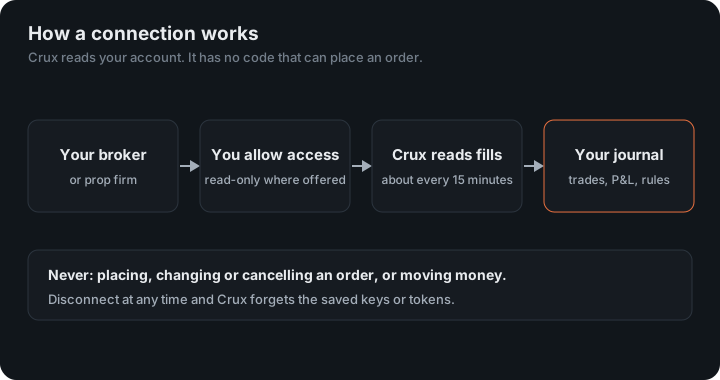
- Connections sync about every 15 minutes. Press Sync to fetch now.
- Most connections import closed trades. A position that’s still open appears once it’s closed.
- Check you connected the right environment — live or demo on cTrader and OANDA, or the right OKX site.
A connection says “Reconnect”
That means the broker refused Crux’s access — usually because a token expired or was revoked, or a key was deleted. Crux pauses that connection instead of trying again and again. Open Profile, choose Reconnect, and connect it again. Common causes:
- Interactive Brokers: the Flex token reached its expiry date.
- cTrader: access was revoked in cTrader settings.
- Crypto exchanges: the API key was deleted, or its permissions were changed.
Crux refused my API key
Crux won’t accept a key that can trade, transfer or withdraw. Create a new key with reading permissions only, connect with that, and delete the old key at the exchange.
Trade times are off by a few hours
Set your time zone under Settings. Crux shows every trade in that zone, and a futures trading day starts at the session hour set there too.
Still stuck?
Email support@cruxjournal.com with the broker name and what you see. Never send us a password, API secret or token.
Numbers don’t match my broker
- Before costs. TradeLocker and DXtrade histories leave out commissions and swaps, so P&L there is before them.
- Pairing. Most connections send fills, and Crux pairs them first in, first out. A broker that shows positions averaged, or hedged, can show different entry prices for the same total P&L.
- Missing history. If a position was opened before the history Crux can see, the sale that closed it has nothing to pair with. Spot crypto leaves it out rather than inventing a short; import the older history to fill the gap.
- Currency. A cross pair on TradeLocker or DXtrade stays in its own quote currency rather than being converted at a rate Crux doesn’t have.
The same trade appears twice
That usually means it came in from a connection and from a file whose rows don’t carry the broker’s own fill ids. Delete the duplicates on the Trades page; Crux takes a backup first, so it can be undone. Importing Crux’s own export, or Tradovate’s Performance CSV, never duplicates, because those carry ids Crux recognises.
A trade is missing
Check the history limits: cTrader and TopstepX start 90 days back, Crypto.com 60, OKX three months, and Tradovate only from the day you connected. Binance.US can miss a coin you sold completely before connecting. In each case, a file import fills the gap.
Why a connection asks you to reconnect
- NinjaTrader or Tradovate: access lasts about 80 minutes and is renewed on each sync; after a long gap, sign in again.
- OANDA: the token was revoked or replaced in Manage API Access.
- tastytrade or cTrader: access was revoked in their settings.
- Interactive Brokers: the Flex token reached its expiry date.
- Crypto exchanges and TopstepX: the key was deleted or its permissions changed.
- TradeLocker or DXtrade: your platform password changed.
Keep reading
- Before you trade — One answer to “can I take this trade?”, against every limit you set.
- Grow your faith — A journal for your faith: commitments, streaks, studies, devotions and prayer.
- Daily verse — An optional Bible verse the first time you open Crux each day.