Connect Crypto.com Exchange
The Crypto.com Exchange is a cryptocurrency exchange. Crux reads your trades there with an API key that has trading turned off.
Create an API key on the Crypto.com Exchange with trading off.
In Crypto.com Exchange, once
- On the Exchange, go to Settings → API Keys → Create a new API key.
- Leave Trade and Withdraw off.
- Copy the API key and Secret key.
In Crux
- Choose Add broker or prop firm → Connect Crypto.com Exchange.
- Paste the API key and Secret key.
- Choose Connect and import. Crux checks the key with Crypto.com Exchange first, then imports your fills and pairs your buys and sells into trades.
How far back does the first sync go?
The first sync reads your last 60 days of trades, one day at a time, so it can take a minute. Later syncs only fetch what’s new.
How does Crux turn Crypto.com fills into trades?
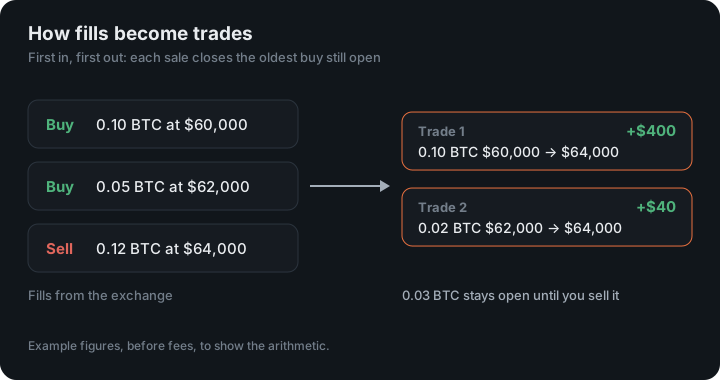
It pairs your buys and sells first in, first out, into trades with an entry, an exit, fees and P&L. Crypto.com reports fills (each buy and sell), not whole trades. A sell with no earlier buy stored — say, coins you bought before the history Crux can see — isn’t counted as a short. It’s left out rather than guessed.
Trades from Kraken, Coinbase, OKX, Binance.US and Robinhood are paired the same way.
Exchange or App?
Crypto.com has two products, and only one has an API. The Exchange, at exchange.crypto.com, can be connected here. The Crypto.com App has no trading API at all, so for the App, export a transaction statement and import the file. If you use both, do both; they arrive as separate accounts.
Older history
The Exchange serves at most one day of history per request, so the first sync walks back day by day for 60 days. For trades older than that, export them from the Exchange and import the file. After the first sync, each one starts from the last fill Crux stored.
An example
You buy 1,000 CRO at $0.10 and later sell 1,000 at $0.12. Crux records one trade: entry $0.10, exit $0.12, $20 before fees, with the Exchange’s fees on both fills taken off the net.
Figures in the example are illustrative, to show the arithmetic. Your own come from your account.
Deposits, staking and rewards
Only trades come in. Deposits, withdrawals, staking and card rewards aren’t trades, so they stay out of your P&L. If you sell coins you received that way rather than bought on the Exchange, there is no buy to pair with, so the sale is left out rather than counted as a short.
How fees are counted
The Exchange charges a fee on each fill, sometimes in the coin you bought. Crux converts a fee paid in the coin you traded, or in the quote currency, into the quote currency at the fill’s price, so fees and P&L are always in the same currency. To end access, disconnect under Profile and delete the key on the Exchange.
Keep reading
- Connect OKX — Create a read-only API key and passphrase in OKX.
- Connect Robinhood Crypto — Crux creates a key for you; paste its public half into Robinhood.
- Connect Coinbase — Create a view-only API key on the Coinbase Developer Platform.