Account balance and scaling plan
Your real balance, and the number you want to reach before you trade bigger.
Your account balance
Crux shows each account’s balance and always says where the figure came from:
- Straight from your broker wherever it reports one — OANDA and cTrader today — refreshed every time your trades sync, with how long ago it was read. It already includes every deposit and withdrawal you have made.
- An estimate for everything else, such as file imports: your starting balance, plus the P&L of those trades, plus the deposits and withdrawals you record. It is labelled as an estimate so it is never mistaken for your broker’s figure.
Keeping the estimate right
- Open Settings → Session & risk and enter your starting balance.
- Whenever you move money in or out, open Settings → Account balance, enter the date and amount — positive for a deposit, negative for a withdrawal — and choose Record it.
With no starting balance the estimate is only your P&L, and Crux says so rather than calling it a balance. Accounts in different currencies are listed separately and never added together.
How does a scaling plan work?
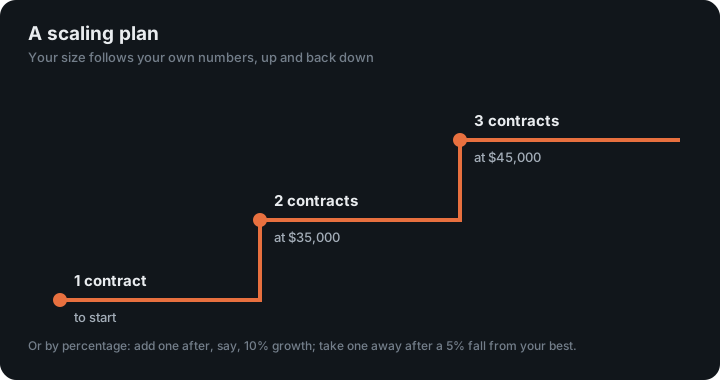
Write down the balance or profit you want to see before you trade bigger — for example, one contract to start, two at $35,000, three at $45,000. Crux tracks how far you are from the next step, tells you when you reach it, and flags any trade you sized up before you got there.
Crux never suggests the numbers. The steps and the sizes are yours; the plan exists so you decide them once, calmly, instead of after a good week.
Set one up
- Open Scaling plan in the sidebar. You can also put it on your dashboard: choose Customise and add the Scaling plan card.
- Choose how it is measured: Account balance, or Profit since the start date.
- Enter the size you start at, then each step: the amount to reach and the size it allows. Add a note to a step if you like — “add ES alongside MES”.
- Choose Save plan.
Balance or profit?
- Balance counts deposits, which suits “I want $15,000 in the account before I trade two”.
- Profit doesn’t, which suits “I want to have made $5,000 before I trade two”.
What Crux tells you
- When you reach a step, and when you drop back below one — in the app, and by email if you have alerts turned on.
- Sized up early: any trade bigger than your plan allowed at the time it was taken. Each trade is judged against the step you were on then, not the one you are on now.
- If you have been allowed a bigger size for a while and are still trading smaller, Crux mentions it once. Trading smaller than your plan allows is never counted against you.
Can it size you up and down by percentage?
Yes. Choose By percentage under How you size up, and set two numbers: the growth that adds a size, and the fall that takes one away. With 10% and 5%, a $10,000 account trading 1 contract can trade 2 once it closes a day at $11,000 or more. If it then falls 5% from its best close since that change, it goes back to 1.
- After any change, both numbers start again from that day’s close, so every step up is earned afresh.
- Only trading counts. Growth is your P&L since the plan started, so a deposit never sizes you up and a withdrawal never sizes you down. With a balance your broker reports, Crux can’t tell deposits apart, as with step plans.
- It is judged at each day’s close, one step at a time, so a swing inside a session never changes your size.
- You choose how much each step adds or takes away, your smallest size, and, if you like, your largest.
The alerts and the Sized up early check work the same way: each trade is judged against the size its day opened with.
Why does size need a plan?
Because size multiplies everything. Futures are leveraged, so a small move in price can be a large gain or loss against the money in the account, as the CFTC’s guide to futures explains, and trading on margin magnifies losses the same way (Investor.gov). A scaling plan ties your size to what the account has actually earned, and takes it back down when the account gives it back.
Keep reading
- Risk rules, what-if and goals — Your own rulebook checked on every trade, a simulator to test a rule first, and monthly goals.
- Daily check-in — Rate your sleep, energy, focus and stress before you trade, and see what your state costs.
- Weekly and monthly reviews — Your week or month written up, compared with the one before, with one thing to work on.