Risk rules, what-if and goals
Your own rulebook checked on every trade, a simulator to test a rule first, and monthly goals.
Risk rules
Open Risk rules and set any of these. Leave a box empty to switch a rule off.
- Max trades a day
- Max loss on one trade
- Stop after this many losses in a row
- Max position size, in contracts or shares
- Entry hours: no entries before or after a time, in your time zone
Crux checks every trade against them from your fills alone, with nothing to tick. That includes trades from before you set the rules. The page shows how often you kept them, how many days were clean, and what the trades that broke a rule made or lost, rule by rule. When a new trade breaks one, you get an alert by email and a banner in the app, once per rule per day. A rule you broke at least twice in a week at a cost becomes that week’s “one thing” in your review.
What would a rule have saved you?
Test a rule on your own trades before you adopt it. What-if replays your history with the rule applied: trades it would have prevented are skipped, and the rest of each day plays out as it did. You can combine:
- stop after a number of losses in a row, or once you are down or up a set amount on the day
- take at most a number of trades a day
- cap every loss at an amount (this assumes your stop would have filled there)
- skip certain hours, days of the week or setups
- skip trades you scored as breaking your playbook
At the top, Crux tries the obvious rules on its own and shows the ones that would have helped. Where a suggestion is also a risk rule, Make it a rule adds it in one click.
Goals
On the Dashboard, choose Edit goals and set any of these for the month:
- Net P&L
- Paced by trading days, so halfway through the month it tells you whether you are ahead of or behind where you need to be.
- Plan followed
- The share of trades you scored against a playbook that kept it.
- Red days
- At most this many losing days. Once you go over it, it is missed for the month.
- Risk-rule breaks
- At most this many trades that broke one of your risk rules.
Goals also appear in your weekly and monthly review, by email and in the app.
How are rule breaks counted?
From the clock, per trading day. Trade number and losing streak are worked out the same way as on the Habits tab: by when each trade opened and closed. So “stop after 3 losses in a row” is broken by the fourth trade opened after three losses had closed, not by a trade that was already running.
An example
You set a maximum of 4 trades a day. Over a month, 6 days had a fifth trade or more. Those extra trades lost $480 between them, while the trades that kept to the rule made $1,200. The page puts both numbers side by side, so you can see what the rule is worth in your own dollars.
Figures in the example are illustrative, to show the arithmetic. Your own come from your account.
An example from What-if
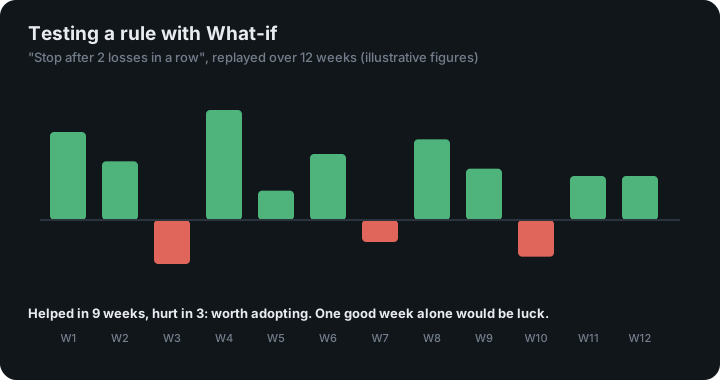
Try “stop after 2 losses in a row” on three months of trades. What-if removes every trade you took after a second straight loss, keeps the rest of each day as it was, and reports the difference: say $640 better in total, helping in 9 weeks and hurting in 3. A rule that helps in most weeks is worth adopting; one that only helped in a single week is probably luck. The figures are illustrative.
An example of a paced goal
Set a net P&L goal of $2,000 for a month with 20 trading days. Ten trading days in, you are on track at $1,000 or more, because the goal is paced by trading days gone rather than judged on any one day. A red-days goal of 5 is on track until the sixth red day, then missed for the month.
Two well-studied tendencies are why these rules help. After losses, people tend to take more risk to get back to even. That is one of the findings of prospect theory, the work that earned Daniel Kahneman the 2002 Nobel prize in economics (the Nobel committee’s announcement). And looking back, outcomes seem more predictable than they were, which psychologists call hindsight bias. That is why What-if counts the weeks a rule hurt as well as the weeks it helped.
Keep reading
- Weekly and monthly reviews — Your week or month written up, compared with the one before, with one thing to work on.
- Account balance and scaling plan — Your real balance, and the number you want to reach before you trade bigger.
- Prop firm evaluations — Track drawdown, daily loss, profit target and consistency against your own trades.