Connect Coinbase
Coinbase is a US cryptocurrency exchange. Crux reads your Coinbase trades with a view-only API key.
Create a view-only API key on the Coinbase Developer Platform.
In Coinbase, once
- Open the Coinbase Developer Platform → API keys → Create API key.
- Under Advanced settings, choose the ECDSA signature algorithm.
- Give it View permission only. Leave Trade and Transfer off.
- Copy the API key name (it starts
organizations/) and the whole private key, including the BEGIN and END lines.
In Crux
- Choose Add broker or prop firm → Connect Coinbase.
- Paste the API key name and the Private key.
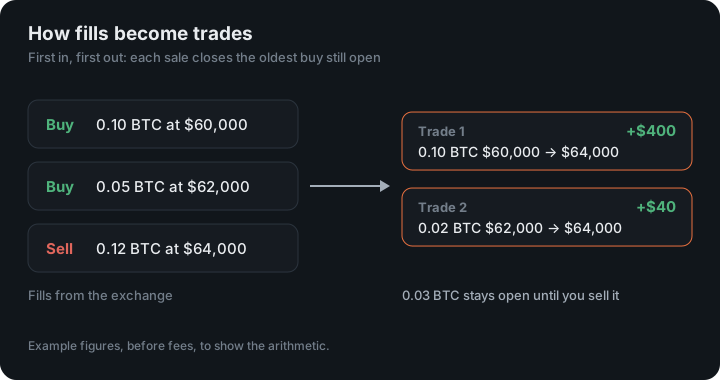
- Choose Connect and import. Crux checks the key with Coinbase first, then imports your fills and pairs your buys and sells into trades.
How does Crux turn Coinbase fills into trades?
It pairs your buys and sells first in, first out, into trades with an entry, an exit, fees and P&L. Coinbase reports fills (each buy and sell), not whole trades. A sell with no earlier buy stored — say, coins you bought before the history Crux can see — isn’t counted as a short. It’s left out rather than guessed.
Trades from Kraken, OKX, Crypto.com, Binance.US and Robinhood are paired the same way.
Why else might a Coinbase key not work?
- The wrong signature type. Coinbase offers Ed25519 and ECDSA keys; Crux needs ECDSA, chosen under Advanced settings when you create the key.
- A partial private key. Paste all of it, including the BEGIN and END lines. A key copied without them can’t sign anything.
- The key name. It starts with
organizations/. A short id on its own isn’t the name Coinbase expects.
Which Coinbase does it read?
Coinbase Advanced Trade, through the Coinbase Developer Platform. Each fill is stored as it arrives, and later syncs only ask for newer ones. If some of your history is missing, export it from Coinbase and import the file; fills that arrive both ways are counted once.
An example
You buy 2 ETH at $3,000 and sell 2 ETH at $3,150, paying $9 in fees on each side. Crux records one trade: 2 ETH, entry $3,000, exit $3,150, gross $300, fees $18, net $282.
Figures in the example are illustrative, to show the arithmetic. Your own come from your account.
Deposits and transfers
Only trades come in. Coins sent to or from Coinbase, and staking rewards, aren’t trades, so they stay out of your P&L. A sale of coins you transferred in has no buy here to pair with, so it is left out rather than counted as a short.
To stop Crux reading your account, disconnect it under Profile and delete the key in the Coinbase Developer Platform.
How fees are counted
Coinbase reports a commission on each fill. Crux converts it into the quote currency at the fill’s price and takes it off the trade’s P&L, so a round trip shows both sides’ fees, as in the example above.
Keep reading
- Connect Kraken — Create a read-only API key in Kraken.
- Connect OKX — Create a read-only API key and passphrase in OKX.
- Connect Interactive Brokers — Set up a Flex report once in Client Portal and give Crux its token.