Connect Kraken
Create a read-only API key in Kraken.
In Kraken, once
- Go to Settings → API → Create API key.
- Tick only Query Funds and Query Closed Orders & Trades.
- Leave every trading, deposit and withdrawal permission off.
- Save, then copy the API key and the Private key.
In Crux
- Choose Add broker or prop firm → Connect Kraken.
- Paste the API key and Private key.
- Choose Connect and import. Crux checks the key with Kraken first, then imports your fills and pairs your buys and sells into trades.
How does Crux turn Kraken fills into trades?
It pairs your buys and sells first in, first out, into trades with an entry, an exit, fees and P&L. Kraken reports fills (each buy and sell), not whole trades. A sell with no earlier buy stored — say, coins you bought before the history Crux can see — isn’t counted as a short. It’s left out rather than guessed.
Trades from Coinbase, OKX, Crypto.com, Binance.US and Robinhood are paired the same way.
Why does BTC show up as XBT in Kraken?
Kraken names some assets its own way: XBT for bitcoin and XDG for dogecoin, and older pairs carry X and Z prefixes, so bitcoin against the dollar is XXBTZUSD. Crux reads Kraken’s own list of pairs and translates them, so a Kraken BTC/USD trade is the same BTCUSD as everywhere else in your journal and filters together with it.
Can Crux tell what my key is allowed to do?
No: Kraken doesn’t report a key’s permissions. That is why the steps above say exactly which two boxes to tick and which to leave off. Crux never calls a trading, deposit or withdrawal function in any case, but a key with only Query Funds and Query Closed Orders & Trades can’t do anything else, whoever holds it.
Busy accounts
Kraken limits how fast a key may ask for history. On an account with years of trades, the first sync reads page after page and, if Kraken asks it to slow down, waits a few seconds before trying again. Leave it running; later syncs only read what’s new.
An example
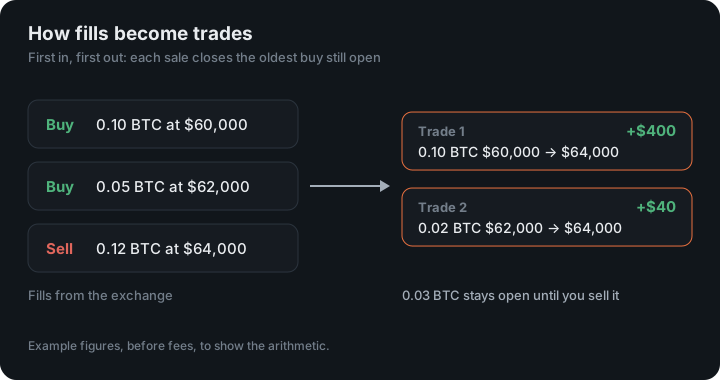
You buy 0.10 BTC at $60,000, then 0.05 more at $62,000, and later sell 0.12 at $64,000. First in, first out, the sale closes all of the first buy and 0.02 of the second, so it becomes two trades: 0.10 BTC from $60,000 to $64,000, $400 before fees, and 0.02 BTC from $62,000 to $64,000, $40. The remaining 0.03 BTC stays open until you sell it.
Figures in the example are illustrative, to show the arithmetic. Your own come from your account.
Margin and deposits
Margin trades are kept on their own book, where a short is real and is paired as one. Deposits, withdrawals and staking rewards aren’t trades, so they stay out of your P&L; a spot sale of coins you deposited has no buy to pair with and is left out rather than counted as a short.
Keep reading
- Connect Interactive Brokers — Set up a Flex report once in Client Portal and give Crux its token.
- Connect Coinbase — Create a view-only API key on the Coinbase Developer Platform.
- Connect tastytrade — Sign in on tastytrade and grant read-only access. Stocks, options, futures and crypto.